

Anonymous
Not applicable
Options
- Mark as New
- Bookmark
- Subscribe
- Mute
- Subscribe to RSS Feed
- Permalink
- Report Inappropriate Content
03-26-2025 01:14 PM in
Discussions
One beta 6, whenever I call someone or they call me, the background is all yellow instead of the background I've chosen. I've submitted an error report. I've even disabling and re-enabling the background I have chosen. It's still all yellow.

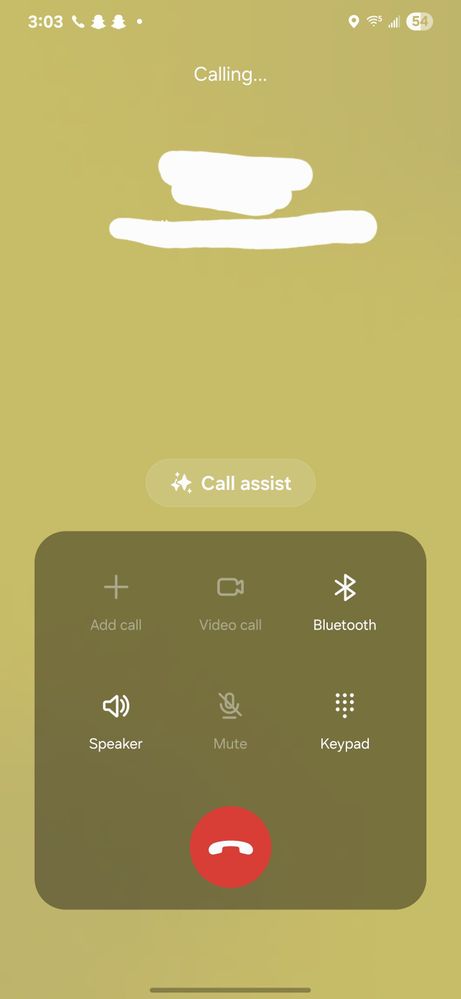
Above is what I have chosen. Below is how it looks when I call:
6 Replies

Confused980
Comet
Options
- Mark as New
- Bookmark
- Subscribe
- Mute
- Subscribe to RSS Feed
- Permalink
- Report Inappropriate Content
03-26-2025 02:53 PM in
Discussions
Same thing happened to me. Had to reset my background to go back to normal

HelloimRyan
Sun
Options
- Mark as New
- Bookmark
- Subscribe
- Mute
- Subscribe to RSS Feed
- Permalink
- Report Inappropriate Content
03-29-2025 04:04 PM in
Discussions
How do you do that please?

USBetaModerator
Beta Moderator
Options
- Mark as New
- Bookmark
- Subscribe
- Mute
- Subscribe to RSS Feed
- Permalink
03-27-2025 11:26 AM in
DiscussionsHello,
Thank you very much for the feedback and submitting an error report.
We will evaluate further into this observation.
Regards,
One UI Beta Team
HelloimRyan
Sun
Options
- Mark as New
- Bookmark
- Subscribe
- Mute
- Subscribe to RSS Feed
- Permalink
- Report Inappropriate Content
03-29-2025 04:04 PM in
Discussions
Mine is not working either. It's pink if I don't have a profile picture. I hate it
HelloimRyan
Sun
Options
- Mark as New
- Bookmark
- Subscribe
- Mute
- Subscribe to RSS Feed
- Permalink
- Report Inappropriate Content
03-30-2025 12:36 PM in
Discussions
I figured out if you have this issue creating a profile card in contacts will work and you can make the background anything from your gallery. It is individual and may take time if you talk to a lot of people but it was the only thing that worked for me. I tried clearing the cache and data even in the call app and it still didn't make a difference so I figured what I said out as a workaround until it's fixed in the software. Hope this helps someone. Have a great day and God bless you
Anonymous
Not applicable
Options
- Mark as New
- Bookmark
- Subscribe
- Mute
- Subscribe to RSS Feed
- Permalink
- Report Inappropriate Content
03-30-2025 01:22 PM in
Discussions
Yeah, it's not a big deal for me. I'll just wait until the next update to fix it but thank you. God bless you too!
