

- Mark as New
- Bookmark
- Subscribe
- Mute
- Subscribe to RSS Feed
- Permalink
- Report Inappropriate Content
05-20-2023 02:21 AM (Last edited 05-24-2023 10:57 AM by SamsungJodi ) in
Galaxy Note PhonesWhere do I find and how do I disable background usage limits on my Note 9.
Solved! Go to Solution.
1 Solution
Accepted Solutions

 Samsung_Moderat
- Mark as New
- Bookmark
- Subscribe
- Mute
- Subscribe to RSS Feed
- Permalink
05-22-2023 01:31 PM in
Galaxy Note PhonesHello, Welcome to the Community. To disable background usage follow these steps:
Open the Settings
Scroll down and select Apps
Select the app you want to disable the background usage for
Select Mobile Data
Toggle Off Allow background data usage
Be sure to click " ✓ Accept as Solution" when you find an answer that works for you.
Please note, notification emails are a DO NOT REPLY address, you must log-in on the community page in order to respond.

- Mark as New
- Bookmark
- Subscribe
- Mute
- Subscribe to RSS Feed
- Permalink
- Report Inappropriate Content
05-20-2023 03:42 AM in
Galaxy Note Phones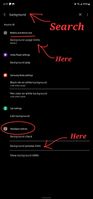 Samsung_Moderat
- Mark as New
- Bookmark
- Subscribe
- Mute
- Subscribe to RSS Feed
- Permalink
05-22-2023 01:31 PM in
Galaxy Note PhonesHello, Welcome to the Community. To disable background usage follow these steps:
Open the Settings
Scroll down and select Apps
Select the app you want to disable the background usage for
Select Mobile Data
Toggle Off Allow background data usage
Be sure to click " ✓ Accept as Solution" when you find an answer that works for you.
Please note, notification emails are a DO NOT REPLY address, you must log-in on the community page in order to respond.

