

 SamsungKyle
- Mark as New
- Bookmark
- Subscribe
- Mute
- Subscribe to RSS Feed
- Permalink
a week ago in
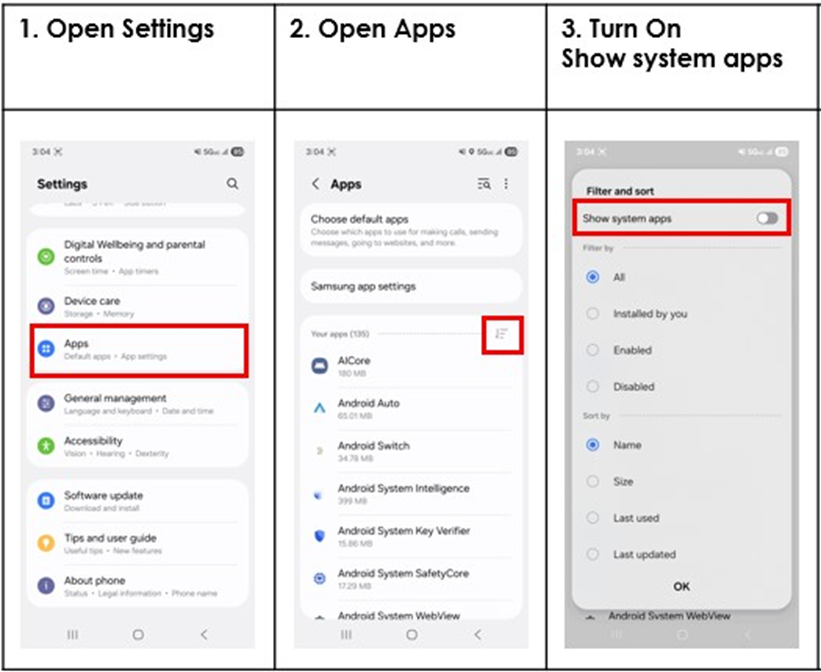
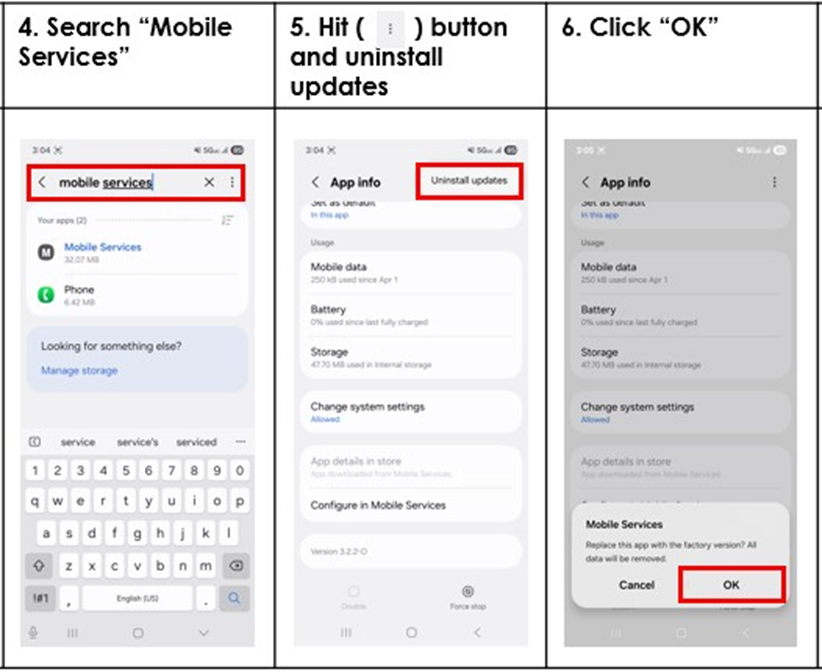
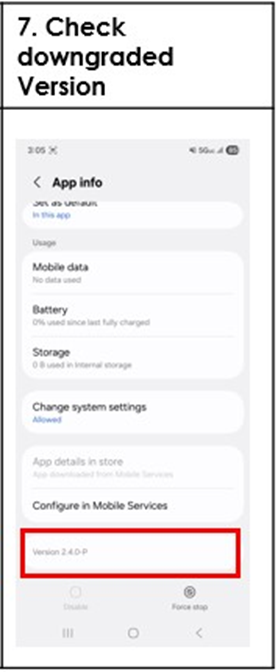
Galaxy S24Hello Community Members. We understand the frustrations caused by the battery drain on your phones and have found a solution. This is occurring on T-Mobile phones because of the mobile services app. In order to remove the application, first open Settings, then open Apps, press the filter and sort icon to the right of Apps. Then turn on Show System Apps and search Mobile Services. Select the three dots to the right of mobile services, and then select Uninstall updates. You will need to select OK. After you have selected OK make sure to check the version it should be downgraded.
This will get you back up and running. If not, don’t hesitate to reach out to us once again! Thank you for being a Samsung customer.


Be sure to click " ✓ Accept as Solution" when you find an answer that works for you.
Please note, notification emails are a DO NOT REPLY address, you must log-in on the community page in order to respond.
- « Previous
- Next »

- Mark as New
- Bookmark
- Subscribe
- Mute
- Subscribe to RSS Feed
- Permalink
- Report Inappropriate Content
3 weeks ago in
Galaxy S24
- Mark as New
- Bookmark
- Subscribe
- Mute
- Subscribe to RSS Feed
- Permalink
- Report Inappropriate Content
3 weeks ago in
Galaxy S24
- Mark as New
- Bookmark
- Subscribe
- Mute
- Subscribe to RSS Feed
- Permalink
- Report Inappropriate Content
3 weeks ago in
Galaxy S24
- Mark as New
- Bookmark
- Subscribe
- Mute
- Subscribe to RSS Feed
- Permalink
- Report Inappropriate Content
3 weeks ago in
Galaxy S24
 SamsungModerato
- Mark as New
- Bookmark
- Subscribe
- Mute
- Subscribe to RSS Feed
- Permalink
Monday in
Galaxy S24Hi @Bwailer17, we understand the frustrations caused by the battery drain on your phones and have found a solution. This is occurring on T-Mobile phones because of the mobile services app. In order to remove the application, first open Settings, then open Apps, press the filter and sort icon to the right of Apps. Then turn on Show System Apps and search Mobile Services. Select the three dots to the right of mobile services, and then select Uninstall updates. You will need to select OK. After you have selected OK make sure to check the version it should be downgraded.
This will get you back up and running. If not, don’t hesitate to reach out to us once again! Thank you for being a Samsung customer.
Be sure to click " ✓ Accept as Solution" when you find an answer that works for you.
Please note, notification emails are a DO NOT REPLY address, you must log-in on the community page in order to respond.

- Mark as New
- Bookmark
- Subscribe
- Mute
- Subscribe to RSS Feed
- Permalink
- Report Inappropriate Content
2 weeks ago in
Galaxy S24Since the software update the following functions are not working anymore. Sound when playing video's (solved this in settings). Screen doesn't shut off after closing my Samsung cover. Time in small screen of Samsung cover doesn't show anymore. I can't redolve these two problems.
Maybe more differences will pop-up in time.

- « Previous
- Next »
