

- Mark as New
- Bookmark
- Subscribe
- Mute
- Subscribe to RSS Feed
- Permalink
- Report Inappropriate Content
3 weeks ago in
Galaxy S24
- Mark as New
- Bookmark
- Subscribe
- Mute
- Subscribe to RSS Feed
- Permalink
- Report Inappropriate Content
3 weeks ago (Last edited 3 weeks ago ) in
Galaxy S24
- Mark as New
- Bookmark
- Subscribe
- Mute
- Subscribe to RSS Feed
- Permalink
- Report Inappropriate Content
3 weeks ago in
Galaxy S24
 SamsungModerato
- Mark as New
- Bookmark
- Subscribe
- Mute
- Subscribe to RSS Feed
- Permalink
3 weeks ago
(Last edited
3 weeks ago
by
SamsungLarry
) in
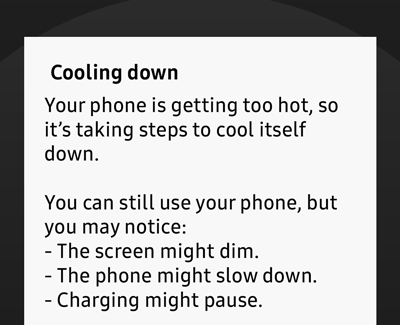
Hey userqxUanj2rM0! Thanks for visiting the Community! Certain apps or environmental factors can cause your phone or tablet to overheat. When this happens, your device will display a message that says "Device cooling down" and will automatically change settings to prevent damage from overheating. To piggyback off of AAbbott, you can give these steps a shot as well.
If the network is disconnected, only emergency calls can be made.
-
Stop using your phone or tablet.
If you receive the "Device cooling down" message, put your phone or tablet down and do not use it until it has cooled sufficiently.
-
Let your phone or tablet cool itself down.
The device will automatically change these settings to prevent overheating:
- Screen brightness may be reduced.
- Running apps may be closed.
- Overall performance may be limited.
- Charging may stop.
- Wi-Fi and cellular networks may be disconnected.
- The Camera app may stop or close with the message "Exit Camera. Battery temperature too high."
-
Make sure to keep your phone or tablet cool.
Once the device has cooled sufficiently, it will return to its normal operation. There are a few things you can do to help cool down your phone or tablet:
- Remove cases or covers you may be using.
- Unplug it from the charger.
- Close all running apps.
- Take a break from using your device.
You can also use our guide to keep your phone or tablet cool.
Please let us know if this helps.
Be sure to click " ✓ Accept as Solution" when you find an answer that works for you.
Please note, notification emails are a DO NOT REPLY address, you must log-in on the community page in order to respond.

